Overview
The Icon block shows a single icon, either from the theme’s icon library or your own uploaded image. Use it to add a visual cue next to a heading or text, for example a tag icon above Special offers or a truck icon for Free delivery. You can set the icon’s size and color, link it to a page, and animate it on scroll. Add it to any section or block that accepts theme blocks, such as Custom section, Group or Image card.
How to use
- Go to Online Store → Themes → Customize.
- Select a section or block that accepts blocks, for example Custom section or Group.
- Click Add block → Icon.
- Choose an Icon from the list, or upload an Image icon.
- Set the Icon size and Icon color.
- Optionally, add a Link.
- Choose a Scroll animation, and adjust the Padding.
- Click Save.
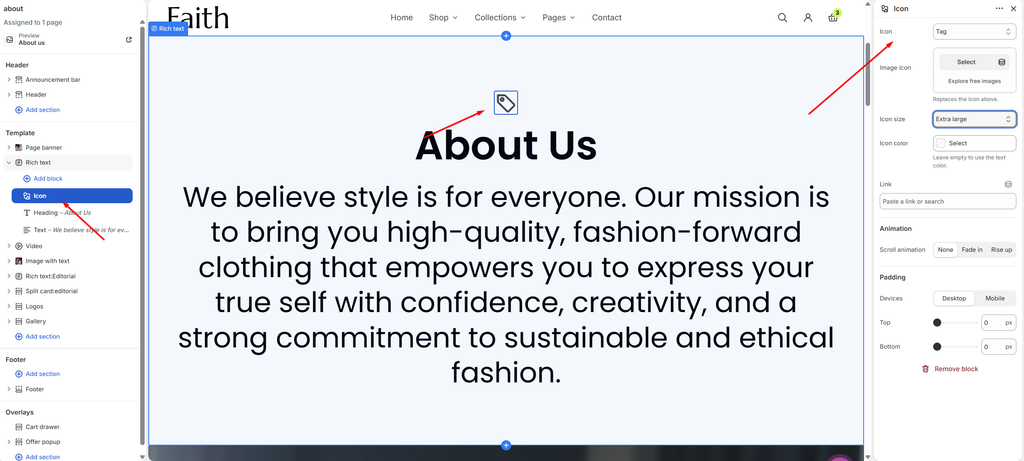
Settings
| Settings | Description |
|---|---|
| Icon | Choose an icon: None, Tag, Percent, Heart, Delivery, Truck, Globe, Return, Credit card, Money, Shield, Lock, Gift, Leaf, Box, Star, Chat, Phone, Calendar, Location, Clock, Question, T-shirt, Washing or Ironing. |
| Image Icon | Upload your own icon. It replaces the icon selected above. Use an SVG or a PNG with a transparent background. |
| Icon Size | Set the icon size: Small, Medium, Large or Extra large. |
| Icon Color | Choose the icon color. Leave it empty to use the text color of the color scheme. This applies to library icons only, not to uploaded images. |
| Link | Add a link to make the icon clickable, for example to a collection or page. |
| Scroll Animation | Choose how the icon appears as customers scroll: None, Fade in or Rise up. |
| Animation Delay | Appears when Scroll animation is not None. Delay the animation (0–800 ms). Use a small delay for a staggered effect with the blocks around it. |
| Padding | Choose Desktop or Mobile under Devices, then adjust the Top and Bottom spacing of the block for that device. |
Tip: To show an icon beside a heading or text, put both blocks in a Group and set its Layout direction to Horizontal. For an icon with a title and a description already laid out, use the Icon box block.