Overview
The Rich text section is a flexible content area for headings, paragraphs and buttons, plus images, icons, dividers and groups. Use it to introduce a page, tell your brand story or add a call to action between other sections, for example About Us with a short mission statement. The Rich text : Editorial preset is the same section with the content placed inside a card (a Group block), ready to edit.
How to use
- Go to Online Store → Themes → Customize.
- Open the page where you want the content.
- Click Add section and choose Rich text or Rich text : Editorial, or select an existing one.
- Click Add block to add a Heading, Text, Button, Image, Image card, Icon, Divider, Spacer, Group, Custom Liquid or an app block. Drag the blocks to reorder them.
- Choose a Color scheme and the content Alignment.
- Adjust the Maximum width and the Vertical gap.
- Set the Section width and the Top and Bottom padding for Desktop and Mobile.
- Click Save.
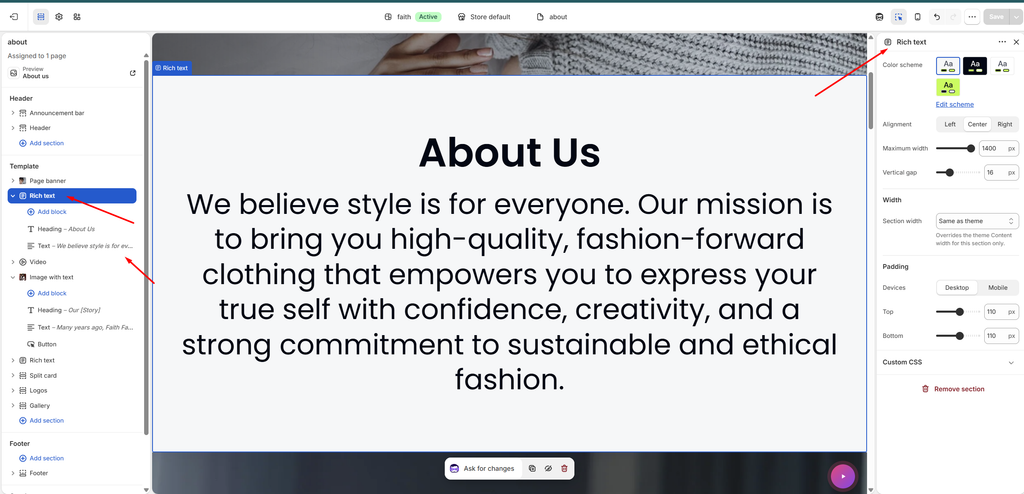
Settings
| Settings | Description |
|---|---|
| Color Scheme | Select a predefined color scheme for the section background and text. |
| Alignment | Align the content to the Left, Center or Right. |
| Maximum Width | Set how wide the content area can grow before the text wraps (400–1400 px). |
| Vertical Gap | Adjust the space between the blocks inside the section (0–60 px). |
| Section Width | Set how wide the section is. Options include Same as theme, Full width, Wide, Standard, Narrow and Custom. This overrides the theme’s content width for this section only. |
| Custom Section Width | Appears when Section Width is set to Custom. Set an exact width for the section (600–2000 px). |
| Padding | Choose Desktop or Mobile under Devices, then adjust the Top and Bottom spacing of the section for that device. |
| Custom CSS | Shopify’s built-in field for adding your own CSS to this section only. |
Tip: For large statement text, like the mission line on an About page, add a Text block and set its Preset to Custom with a large font size. Choose the Split text: line by line animation to reveal it as customers scroll.
Blocks: Heading, Text, Button, Image, Video, Group and Subheading are the common blocks. See their articles for settings.