Metafield Reference
Overview
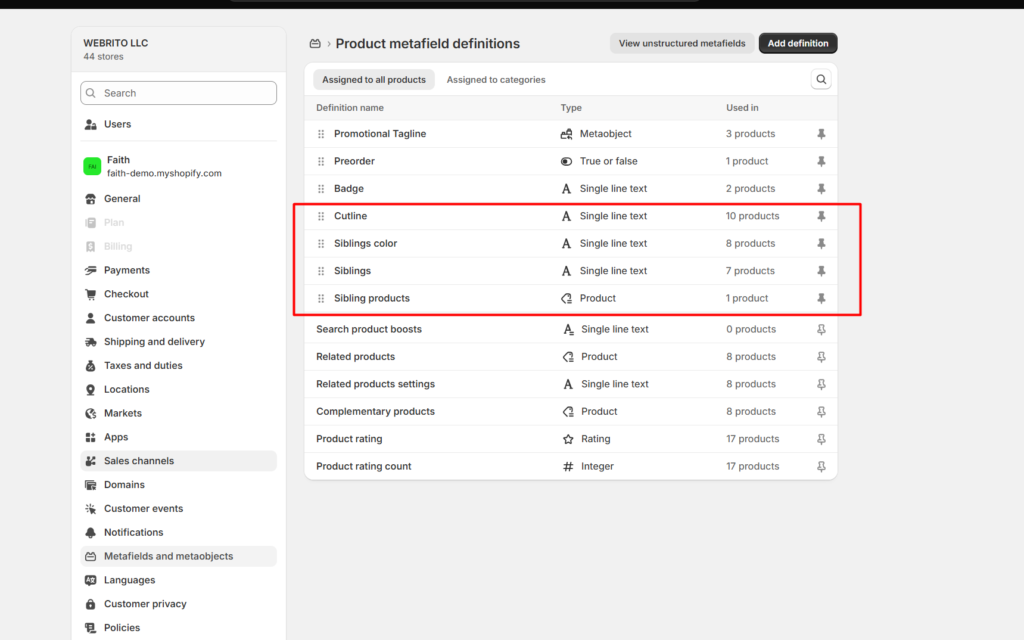
Siblings use product metafields. Create the definitions once in Shopify admin → Settings → Custom data → Products → Add definition, using the namespace and key exactly as shown below. Then fill them in on each product under Metafields.
How to use
- Go to Shopify admin → Settings → Custom data → Products.
- Click Add definition.
- Enter a Name, then set the Namespace and key exactly as listed below, for example theme.sibling_products.
- Choose the Type shown in the table, and click Save.
- Repeat for each metafield you need.
- Open each product and fill in the values under Metafields.
Settings
| Settings | Description |
|---|---|
| theme.sibling_products | Type: Product (list of products). The sibling products for this style. Use this or theme.siblings. |
| theme.siblings | Type: Single line text. The handle of a collection that holds all siblings, for example linen-shirt-all-colors. Used when theme.sibling_products is empty. |
| theme.sibling_color | Type: Single line text, Color, or a Metaobject reference with color fields. This product’s color, for example Navy or #1F2A44. A metaobject can have a label (or name / title) and a color or image field. Use an image for patterns. |
| custom.sibling_color | The same as theme.sibling_color. It is checked if theme.sibling_color is empty, so you can use an existing custom metafield. |
| Custom color metafield | Any product metafield you name in the block’s Color metafield setting, for example custom.colour. It is checked first. |
| shopify.color-pattern | Shopify’s Color category metafield, set by choosing a product category. Used when no color metafield or Color option is found. |
| theme.cutline | Type: Single line text. A short line shown above the title on product cards when siblings are on, for example Sand or Organic linen. It is also used as the sibling’s name when no color is found. |
Color order: For each sibling, Faith reads the color from your Color metafield setting, then theme.sibling_color, then custom.sibling_color, then the product’s Color option, then Shopify’s Color category metafield. With none of these, it uses the product title and image.
Text colors: When the color is text, like Navy, the swatch color comes from Theme settings → Swatches → Color list. Add any missing names there, for example Navy: #1F2A44.