Overview
The Custom Liquid section lets you add your own code to a page: Liquid, HTML, CSS or JavaScript. Use it for app snippets, embed codes (for example a booking widget, a review carousel or a form from another service), tracking scripts that belong on one page only, or small custom features the other sections don’t offer. You can also add a background image and set the section width and padding.
How to use
- Go to Online Store → Themes → Customize and open the page where you want the code.
- Click Add section → Custom Liquid.
- Paste your code into the Custom Liquid field.
- Optionally, select a Background image.
- Set the Section width and Padding.
- Click Save, then check the page on desktop and mobile.
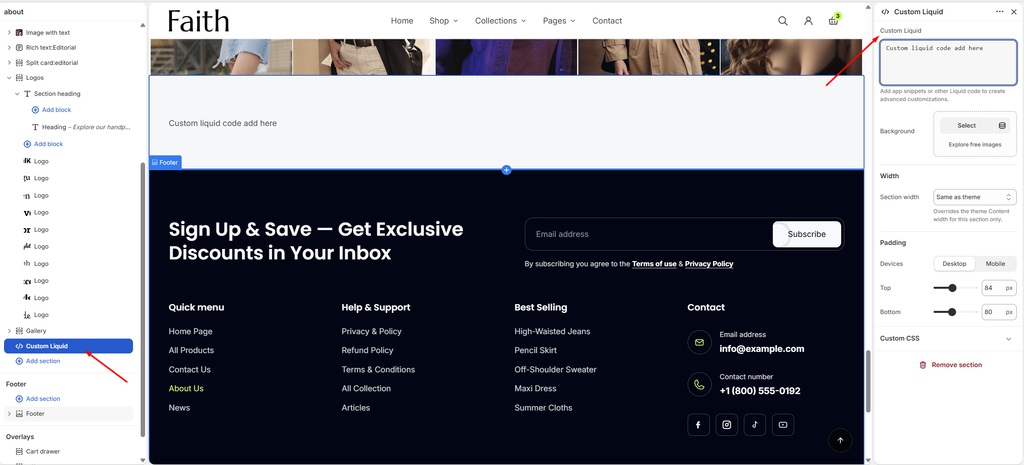
Settings
| Settings | Description |
|---|---|
| Custom Liquid | Paste your Liquid, HTML, CSS or JavaScript code. Use it to add app snippets or other code for advanced customizations. |
| Background | Select an image to show behind the section. |
| Section Width | Set how wide the section is: Same as theme, Full width, Wide, Standard, Narrow or Custom. This overrides the theme Content width for this section only. |
| Custom Section Width | Appears when Section width is Custom. Set an exact width (600–2000 px). |
| Padding | Choose Desktop or Mobile under Devices, then adjust the Top and Bottom spacing of the section for that device. |
Important: Code added here is not checked by the theme. Invalid code can break the layout or slow down your store. Only paste code from sources you trust, test it in a duplicate theme first, and keep a copy of the code somewhere safe.
Tip: If an app offers an app block or app embed, use that instead of pasting code. App blocks update automatically and are removed cleanly when you uninstall the app.
Custom Liquid Block
Overview
The Custom Liquid block adds your own code inside a section, next to other blocks. For example, place a review widget below the product title, or an embed beside a heading. It works in Custom section, Group, Image card, the product page and other sections that accept theme blocks.
How to use
- Go to Online Store → Themes → Customize.
- Select a section or block that accepts blocks, for example Custom section or Group.
- Click Add block → Custom Liquid.
- Paste your code into the Custom Liquid field.
- Adjust the Padding.
- Click Save.
Settings
| Settings | Description |
|---|---|
| Custom Liquid | Paste your Liquid, HTML, CSS or JavaScript code. Use it to add app snippets or other code for advanced customizations. |
| Padding | Choose Desktop or Mobile under Devices, then adjust the Top and Bottom spacing of the block for that device (0–100 px). |
Tip: On the product page, Liquid objects such as
{{ product.title }}or{{ product.metafields.custom.size_guide }}work in this block. Use them to show product-specific content without an app.