Overview
The Icon with text section shows a row of cards, each with an icon in a circle, a heading and a short text. Use it for contact details on the Contact page, for example Our Address, Phone Number, Email Address and Opening Hours, or for store benefits anywhere else. On hover, a fill color grows from the corner of the card, and a soft accent ring decorates each card’s corner.
How to use
- Go to Online Store → Themes → Customize.
- Click Add section → Icon with text, or select an existing one.
- Optionally, edit the Section heading to add a title above the cards.
- Click Add block → Card for each card. In each Card, choose an Icon and edit the Heading and Text.
- Set the Columns on desktop and Columns on mobile, and the Gap.
- Choose the Card color scheme, turn Fill on hover on or off and pick the Hover color scheme, and turn Show corner ring on or off.
- Adjust the Card corner radius, Icon size and Icon circle size.
- Set the Section width and Padding.
- Click Save.
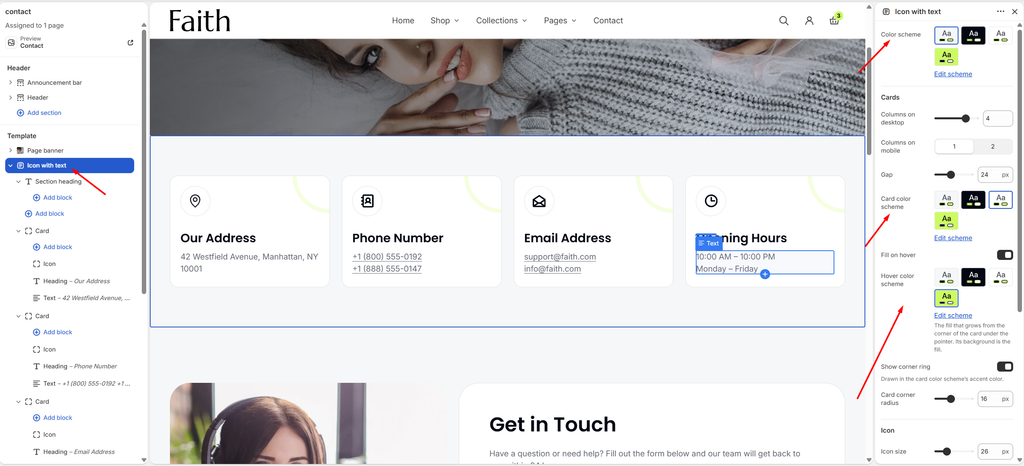
Settings
| Settings | Description |
|---|---|
| Color Scheme | Select a predefined color scheme for the section background. |
| Columns on Desktop | Set how many cards show across on desktop (1–5). |
| Columns on Mobile | Show 1 or 2 cards across on mobile. |
| Gap | Adjust the space between the cards (0–60 px). |
| Card Color Scheme | Select a color scheme for the cards. |
| Fill on Hover | Fill a card with color from its corner when a customer hovers over it. |
| Hover Color Scheme | Appears when Fill on hover is on. Select the color scheme of the hover fill. Its background color is used as the fill. |
| Show Corner Ring | Show a decorative ring in the top corner of each card, drawn in the card color scheme’s accent color. |
| Card Corner Radius | Customize the rounded corners of the cards (0–40 px). |
| Icon Size | Set the size of the icon (12–64 px). |
| Icon Circle Size | Set the size of the circle around the icon (32–120 px). |
| Section Width | Set how wide the section is. Options include Same as theme, Full width, Wide, Standard, Narrow and Custom. |
| Custom Section Width | Appears when Section Width is set to Custom. Set an exact width (600–2000 px). |
| Padding | Choose Desktop or Mobile under Devices, then adjust the Top and Bottom spacing of the section for that device. |
Tip for contact details: In the card’s Text block, link phone numbers with tel: (for example tel:+18005550192) and emails with mailto:, so customers can tap to call or email on their phone. Use a line break to show two numbers or emails in one card.
Card Block
Overview
The Card block is one card in the section. It holds an Icon, a Heading, a Text and, optionally, a Button. The Card itself has no settings: you edit the blocks inside it.
How to use
- Expand Icon with text and click Add block → Card, or select an existing Card.
- Select its Icon block and choose an icon.
- Edit the Heading and Text, or click Add block to add a Button.
- Drag the cards to change their order.
- Click Save.
Icon Block (Icon with Text)
Overview
The Icon block is the icon shown in the circle at the top of each card. Choose a built-in icon or upload your own.
How to use
- Expand Icon with text, then a Card, and select its Icon block.
- Choose an Icon, or upload a Custom icon.
- Click Save.
Settings
| Settings | Description |
|---|---|
| Icon | Choose the icon: None, Location, Address book, Phone, Open envelope, Email, Clock, Calendar, Chat, Question, Delivery, Truck, Globe, Return, Credit card, Money, Shield, Lock, Gift, Heart, Tag, Percent, Leaf, Box or Star. |
| Custom Icon | Upload your own icon (SVG or PNG). It replaces the icon selected above. |
Tip: Icon size and circle size are set on the Icon with text section, so all cards stay consistent. Heading, Text and Button are the common blocks, and the Section heading settings are covered in the Section Heading article.