



How to Access the Testimonials Section
- Go to Admin → Online Store → Themes
- Click Customize on your active theme
- Open the Home page template
- Search for and select the Testimonials section
- Inside this section, you can add:
- Section Header
- Multiple Testimonial cards
- Rating
- Review text
- Customer image
- Author name
- Author designation
The Testimonials section helps display customer reviews, feedback, ratings, and client experiences in a slider format.
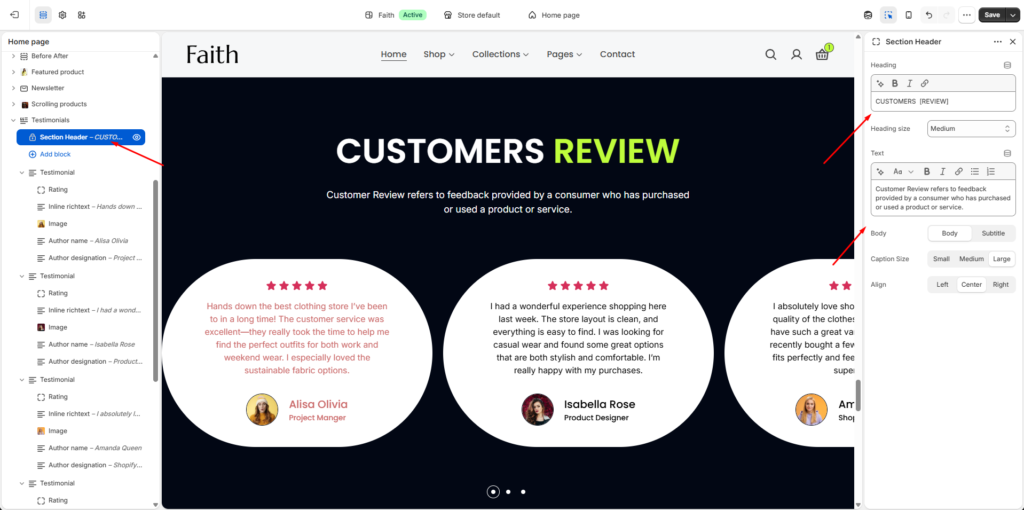
Section Header Settings
The Testimonials section includes a static header area displayed above the testimonial slider.
| Settings | Description |
|---|---|
| Heading | Add the main section heading or title. Example: CUSTOMERS [REVIEW]. |
| Heading Size | Select the heading size such as Small, Medium, Large, or other available heading styles. |
| Text | Add supporting text or a short description below the heading. |
| Body Style | Choose between Body or Subtitle text styles. |
| Caption Size | Adjust the description text size using Small, Medium, or Large options. |
| Alignment | Control the header alignment using Left, Center, or Right. |
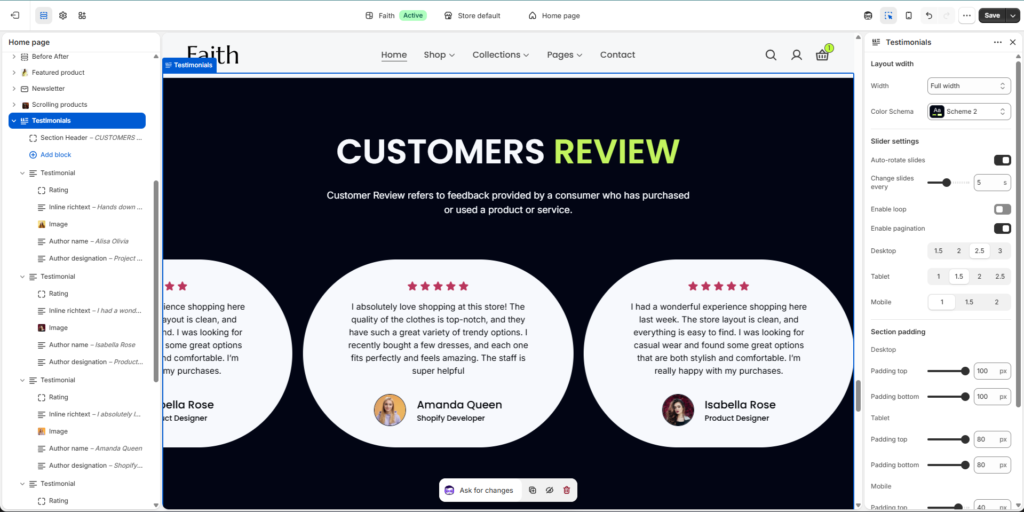
Testimonials Section Settings
| Settings | Description |
|---|---|
| Width | Choose the testimonial section container width. Available options include Page width and Full width. |
| Color Scheme | Select a predefined color scheme to customize the section background and text styles. |
| Auto-rotate Slides | Automatically rotate testimonial slides after a selected time interval. |
| Change Slides Every | Set the slider transition duration in seconds. |
| Enable Loop | Allow testimonial slides to continuously repeat after reaching the last slide. |
| Enable Pagination | Display slider pagination indicators below the testimonials. |
| Desktop Items | Choose how many testimonial cards display per view on desktop devices. |
| Tablet Items | Choose how many testimonial cards display per view on tablet devices. |
| Mobile Items | Choose how many testimonial cards display per view on mobile devices. |
| Padding Top | Add top spacing separately for Desktop, Tablet, and Mobile devices. |
| Padding Bottom | Add bottom spacing separately for Desktop, Tablet, and Mobile devices. |
| Custom CSS | Add custom CSS styles to further customize the testimonial section layout and appearance. |
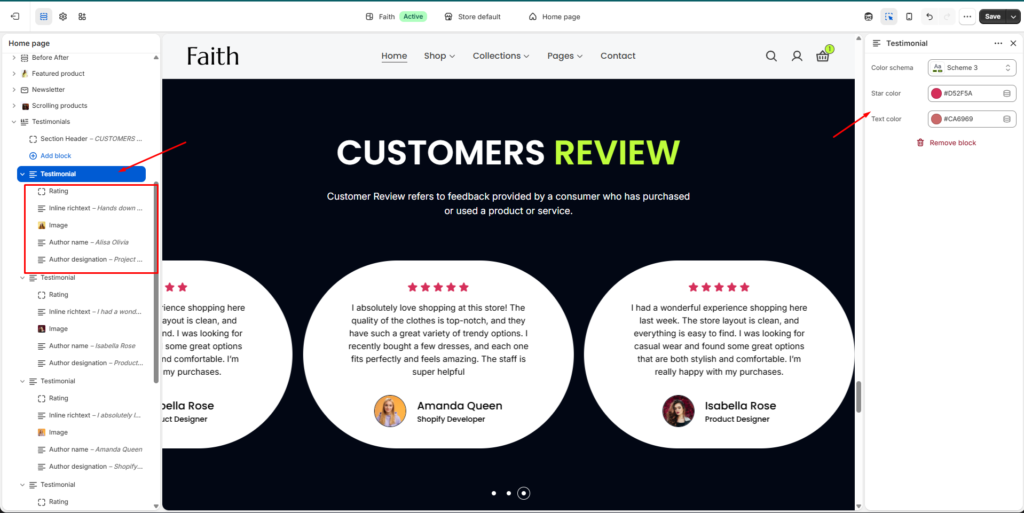
Testimonial Card Settings
Each Testimonial block contains individual customer review content.
| Settings | Description |
|---|---|
| Rating Block | Display customer rating stars inside the testimonial card. |
| Inline Richtext Block | Add customer review content, feedback, or testimonial description text. |
| Image Block | Upload and display the customer profile image/avatar. |
| Author Name | Add the customer or reviewer name. |
| Author Designation | Add customer position, profession, or additional identity information. |
| Color Scheme | Select a predefined color scheme for the testimonial card. |
| Star Color | Customize the rating star color. |
| Text Color | Customize the testimonial review text color. |
| Add Block | Add multiple testimonial cards dynamically inside the section. |
| Responsive Layout | Testimonial cards automatically adjust across desktop, tablet, and mobile devices. |
| Remove Block | Remove the selected testimonial card from the section. |