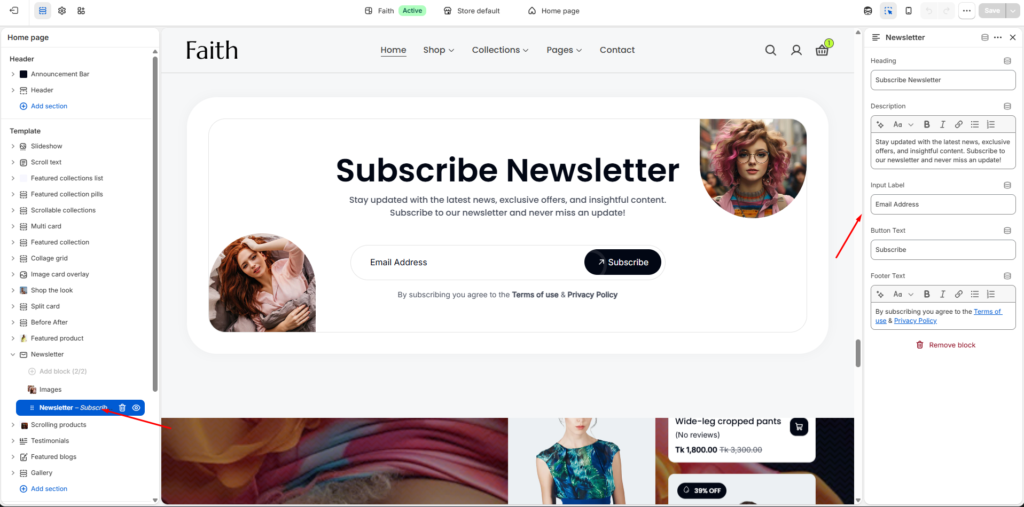
The Newsletter section allows customers to subscribe with their email address and helps stores collect subscribers for promotions, updates, and marketing campaigns.
Newsletter Section Settings
Settings
Description
Color Scheme
Select a predefined color scheme for the newsletter section background and text styles.
Card Color Scheme
Choose a separate color scheme for the newsletter card/container design.
Padding Top
Add top spacing separately for Desktop, Tablet, and Mobile devices.
Padding Bottom
Add bottom spacing separately for Desktop, Tablet, and Mobile devices.
Custom CSS
Add custom CSS styles to further customize the newsletter layout and appearance.
Images Block Settings
Settings
Description
Left Image
Upload an image that will display on the left side of the newsletter card.
Right Image
Upload an image that will display on the right side of the newsletter card.
Image Upload
Select images from your device or choose images from Shopify files.
Decorative Images
Use images to improve the visual appearance and create an engaging newsletter design.
Responsive Layout
Images automatically adjust their size and position across desktop, tablet, and mobile devices.
Remove Block
Remove the selected Images block from the Newsletter section.
Newsletter Content Settings
Customize the newsletter text, input, and button content.
Settings
Description
Heading
Add the main newsletter heading. Example: Subscribe Newsletter.
Description
Add supporting text to explain newsletter benefits, offers, or updates.
Input Label
Customize the email input placeholder/label text. Example: Email Address.
Button Text
Change the subscribe button label text. Example: Subscribe.
Footer Text
Add additional information below the form, such as terms, privacy notice, or subscription message.