



How to Access the Selling Products When Out of Stock (Pre-order) Option
Admin → Products
→ Select your product
→ Go to Inventory section
→ Enable Continue selling when out of stock
→ Save the product
This option allows customers to purchase the product even when inventory quantity is 0. It is mainly used for Pre-order products.
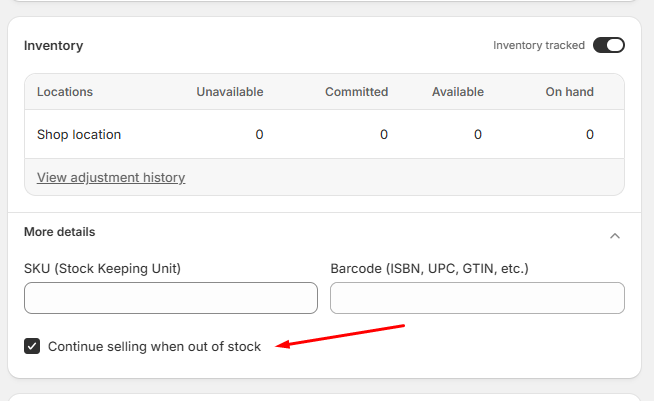
Selling Products When Out of Stock Settings
| Settings | Description |
|---|---|
| Inventory tracked | Enable inventory tracking for the product stock management |
| Quantity | Set product stock quantity |
| Continue selling when out of stock | Allows customers to buy the product when stock reaches zero |
| Save | Apply the inventory changes |
How to Show Pre-order Button
Admin → Products
→ Select product
→ Inventory section
→ Enable Continue selling when out of stock
→ Set inventory quantity to 0
→ Product will display Pre-order instead of normal Add to Cart
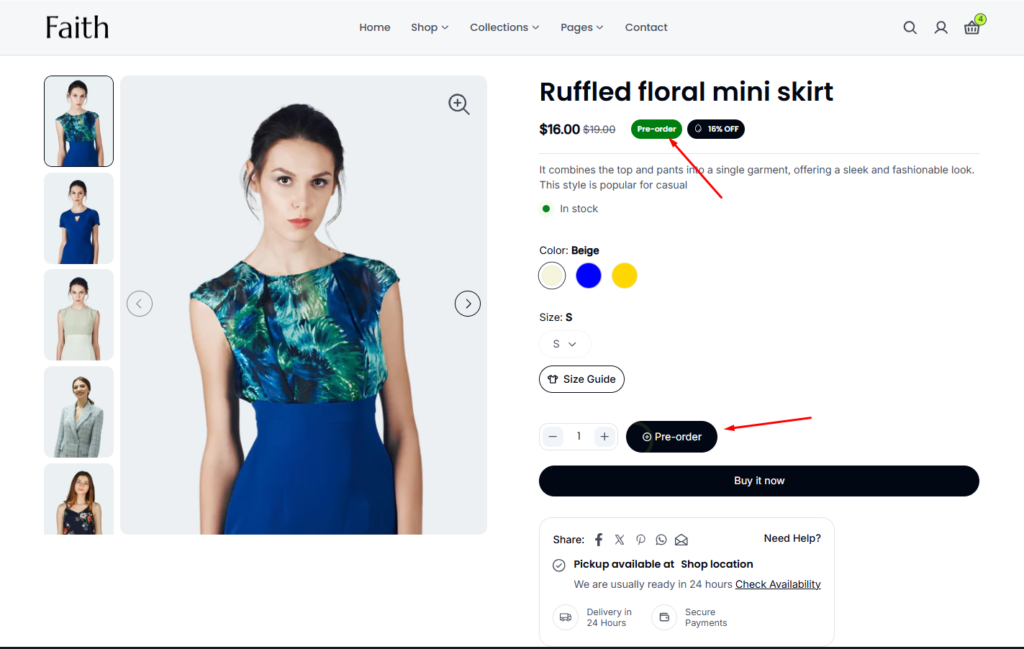
Pre-order Product Display
| Feature | Description |
|---|---|
| Pre-order badge | Shows that the product is available for pre-order |
| Pre-order button | Customers can place orders before restock |
| Product availability | Product remains purchasable even when out of stock |
| Inventory status | Uses Shopify continue selling option |