



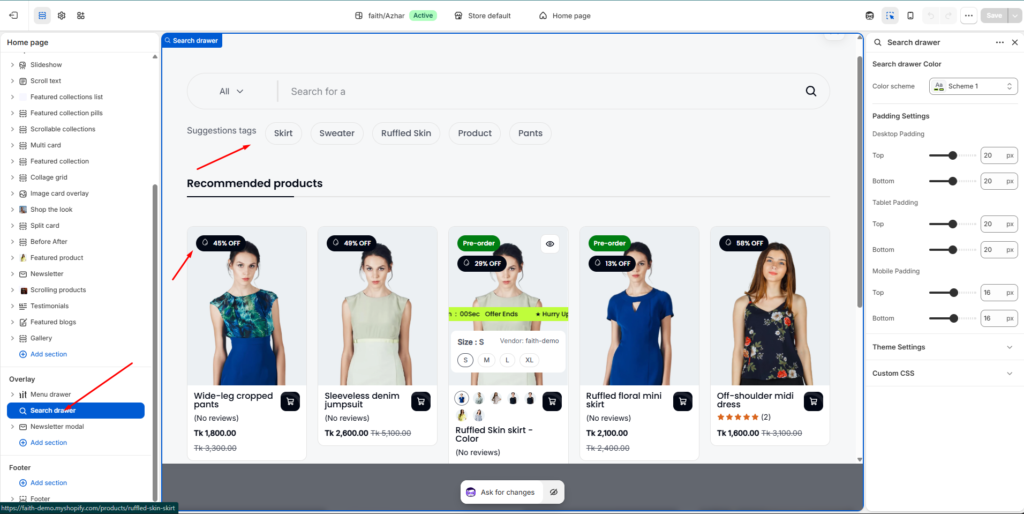
The Search Drawer allows customers to quickly search products, articles, collections, and other store content using an interactive slide-out search interface. It includes predictive search, recommended products, search suggestions, quick add functionality, and customizable search prompts.
How to Access
Go to Admin → Online Store → Themes
- Click Customize on your active theme
- Open Overlay
- Select Search drawer
Search Settings
Product Types Dropdown
Display a product type selector next to the search input in the header search box.
This allows customers to filter searches by a specific product category.
Setting
| Setting | Description |
|---|---|
| Enable product type dropdown | Shows a dropdown selector for product types |
Predictive Search
Predictive search displays instant search results while customers type.
Results may include:
- Products
- Articles
- Collections
- Suggestions
- Pages
Predictive Search Settings
| Setting | Description |
|---|---|
| Enable predictive search | Activates live search suggestions |
| Maximum number of items to show per result type | Controls the number of results shown for each category |
| Image Ratio | Controls product image shape in search results |
| Show secondary image | Displays secondary hover image |
| Show vendor | Displays product vendor name |
| Show rating | Displays product review ratings |
Example
If the limit is set to 5, customers may see:
- 5 Products
- 5 Articles
- 5 Suggestions
- 5 Collections
Quick Add
Allow customers to add products directly from the search drawer without visiting the product page.
Settings
| Setting | Description |
|---|---|
| Enable quick add | Enables add-to-cart button in search results |
| Button style | Choose between Primary or Secondary button styles |
| Button type | Controls button appearance |
Available Button Types
- Icon only
- Icon & text
Search Options
Search SKUs
Allows customers to search products using SKU codes.
Example
SKU-RED-XLSearch Tags
Allows search results to include product tags.
Example:
- Summer
- Cotton
- New Arrival
Suggestions Tags
Display quick-access search tags below the search input.
These tags help customers discover popular searches quickly.
Suggestions Label
Customize the heading shown above the suggestion tags.
Example
Suggestions tagsSuggestions Search Tags
Add search keywords separated by commas.
Example
skirt, sweater, ruffled skin, product, pantsNotes
- Separate each tag using commas
- Multi-word tags are supported
Example:
salt, salt and pepper, silver, black saltLimit
Controls the maximum number of suggestion tags displayed.
Example
| Value | Result |
|---|---|
| 5 | Shows 5 suggestion tags |
Recommended Products
Display selected products inside the search drawer.
These products help promote featured or popular items.
Recommended Label
Customize the heading shown above recommended products.
Example
Recommended productsSelect Products
Choose products to display inside the search drawer.
Example Products
| Product |
|---|
| Wide-leg cropped pants |
| Sleeveless denim jumpsuit |
| Ruffled Skin skirt |
Suggestion Products
Display additional suggested products in the search drawer.
Suggestion Label
Customize the heading shown above suggestion products.
Example
Suggestion productsSelect Products
Choose products to display as additional suggestions.
Example Products
| Product |
|---|
| High-waisted skinny jeans |
| Long-sleeve wrap blouse |
| Ruffled floral mini skirt |
Search Prompts
Search prompts create animated placeholder text inside the search input field.
This helps customers understand what they can search for in your store.
Prompt Settings
| Setting | Description |
|---|---|
| Prompt text 1 | Default search placeholder |
| Prompt text 2 | Secondary animated placeholder |
| Prompt text 3 | Additional rotating placeholder |
Example Prompts
| Prompt | Example Text |
|---|---|
| Prompt text 1 | Search for products |
| Prompt text 2 | Search for articles |
| Prompt text 3 | Search for collections |
Notes
- Predictive search requires Shopify search functionality to be enabled.
- Search results update automatically while typing.
- Product recommendations and suggestion products can be used together.
- Search drawer appearance may vary slightly between desktop and mobile layouts.
- Leaving optional fields blank will hide those sections automatically.