



The Menu Drawer is a mobile-friendly slide-out navigation panel that allows customers to browse menus, collections, pages, contact information, localization settings, and social media links from a single interface.
The drawer can include menus, promotional blocks, product lists, contact details, country/language selectors, and social media icons.
How to Access
Go to Admin → Online Store → Themes
- Click Customize on your active theme
- Open Overlay
- Select Menu drawer
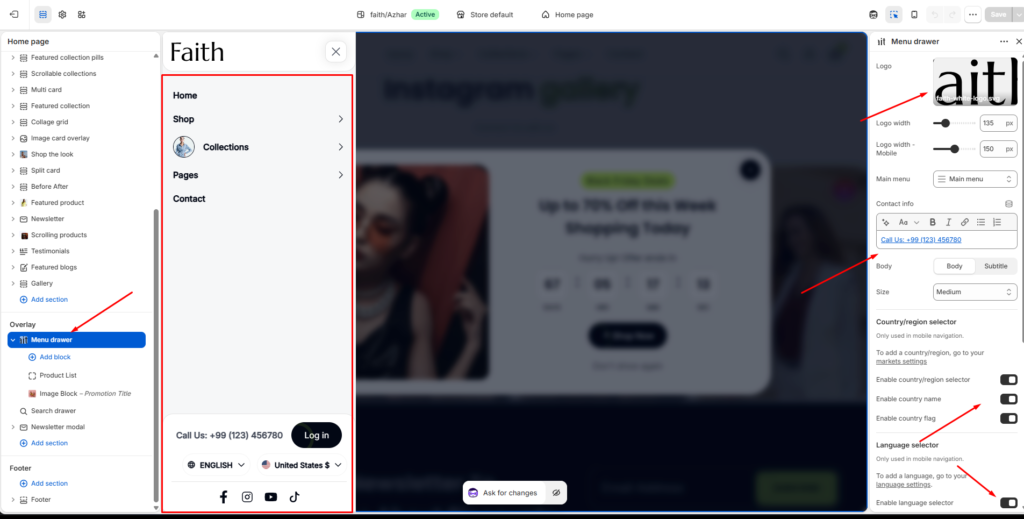
Menu Drawer Layout
The Menu Drawer appears as a slide-out panel from the side of the screen, primarily used for mobile navigation.
It can contain:
- Navigation menus
- Dropdown menu items
- Product blocks
- Promotional image blocks
- Contact information
- Country & language selectors
- Social media icons
Logo Settings
Customize the logo displayed inside the menu drawer.
Logo
Upload a custom logo image for the drawer.
Supported Formats
- PNG
- JPG
- SVG
- WEBP
Logo Width
Controls the desktop logo width inside the drawer.
Example
| Setting | Value |
|---|---|
| Logo width | 135px |
Logo Width – Mobile
Controls the logo size on mobile devices.
Example
| Setting | Value |
|---|---|
| Mobile logo width | 150px |
Navigation Menu
Main Menu
Choose which Shopify navigation menu appears inside the drawer.
Example
| Menu |
|---|
| Main menu |
Contact Information
Display store contact details inside the menu drawer.
This area supports rich text formatting.
Features
| Feature | Description |
|---|---|
| Bold | Highlight important text |
| Italic | Stylized text formatting |
| Link | Add clickable links |
| Alignment | Adjust text alignment |
| Lists | Create ordered/unordered lists |
Example
Call Us: +99 (123) 456780Typography Settings
Body Style
Choose the text style used for contact information.
Available Options
- Body
- Subtitle
Text Size
Controls contact text size.
Example
| Size |
|---|
| Medium |
Country / Region Selector
Allows customers to switch countries or regions directly from the menu drawer.
This setting is primarily used in mobile navigation.
Requirements
Country selector functionality requires Shopify Markets to be configured.
Shopify Markets
Set up markets from:
Shopify Admin → Settings → MarketsAvailable Settings
| Setting | Description |
|---|---|
| Enable country/region selector | Shows country selector |
| Enable country name | Displays country names |
| Enable country flag | Displays country flags |
Language Selector
Allows customers to switch storefront languages directly from the drawer.
This feature is mainly used for mobile navigation.
Requirements
Languages must be configured in Shopify Languages settings.
Shopify Language Settings
Shopify Admin → Settings → LanguagesAvailable Settings
| Setting | Description |
|---|---|
| Enable language selector | Displays language switcher |
Social Media Icons
Display social media icons inside the menu drawer.
Icons automatically appear when social profile links are added in Theme Settings → Social media.
Enable Social Media Icons
Toggle social icons visibility inside the drawer.
Manage Social Accounts
Social links are managed from:
Theme Settings → Social mediaSupported platforms may include:
- TikTok
- YouTube
- X / Twitter
- Vimeo
- Tumblr
- Snapchat
Drawer Color Settings
Customize the appearance of the menu drawer.
Color Scheme
Controls the primary drawer colors.
Example
| Setting | Value |
|---|---|
| Color scheme | Scheme 1 |
Secondary Color
Controls secondary drawer elements such as:
- Buttons
- Highlights
- Borders
- Hover states
Example
| Setting | Value |
|---|---|
| Secondary color | Scheme 3 |
Padding Settings
Adjust spacing inside the menu drawer for different screen sizes.
Desktop Padding
Controls spacing for desktop devices.
| Setting | Description |
|---|---|
| Top | Top inner spacing |
| Bottom | Bottom inner spacing |
Example
| Device | Top | Bottom |
|---|---|---|
| Desktop | 20px | 20px |
Tablet Padding
Controls spacing for tablet devices.
| Setting | Description |
|---|---|
| Top | Top spacing |
| Bottom | Bottom spacing |
Mobile Padding
Controls spacing for mobile devices.
| Setting | Description |
|---|---|
| Top | Top spacing |
| Bottom | Bottom spacing |
Menu Drawer Blocks
The Menu Drawer supports additional content blocks.
Product List Block
Display featured or promotional products directly inside the drawer.
Features
- Product image
- Product title
- Price
- Quick access links
Image Block
Display promotional banners or branded content inside the drawer.
Example Uses
- Seasonal sales
- New arrivals
- Collection promotions
- Brand campaigns
Drawer Navigation Features
The drawer supports:
- Multi-level navigation
- Expandable dropdown menus
- Collection links
- Page links
- Product category navigation
Notes
- The Menu Drawer is optimized primarily for mobile navigation.
- Country and language selectors require Shopify Markets and Languages configuration.
- Social media icons only appear if social profile links are added.
- Padding and color settings may vary slightly depending on device size and theme layout.
- Blocks can be reordered inside the theme editor using drag-and-drop.