



Overview
The Title block allows you to add customizable headings inside any section. It helps structure page content and highlight important information such as section titles, promotional messages, or call-to-action headings.
How to use
- Go to Customize Theme.
- Open the section where you want to edit the title.
- Select the Title block.
- Enter your heading text in the Title field.
- Choose your preferred Heading Size.
- Adjust padding values if extra spacing is needed.
- Click Save.
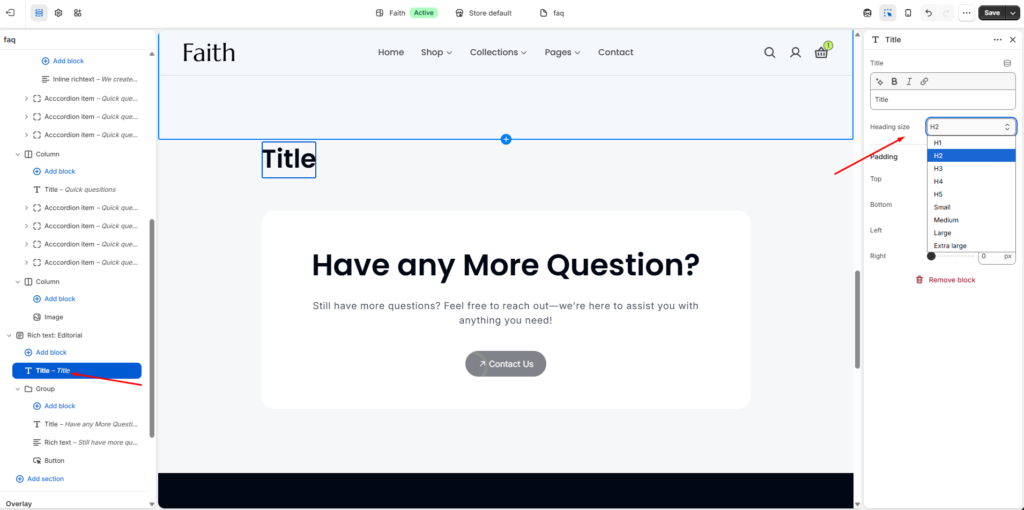
Title Block Documentation
| Settings | Description |
|---|---|
| Title | Add or edit the heading text displayed inside the section. |
| Heading Size | Choose the title size style. Available options include H1, H2, H3, H4, H5, Small, Medium, Large, and Extra Large. |
| Padding Top | Adjust the spacing above the title block. |
| Padding Bottom | Adjust the spacing below the title block. |
| Padding Left | Adjust the left side spacing of the title block. |
| Padding Right | Adjust the right side spacing of the title block. |