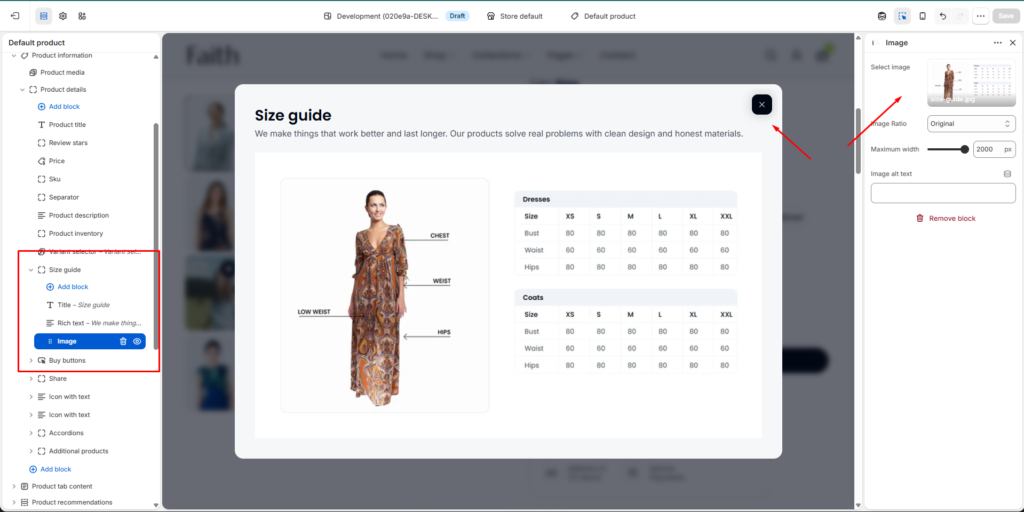
Go to Admin → Online Store → Themes Click Customize on your active theme Open Default product template Select the Product information section Find and select the Size Guide block
From here, you can customize:
Size guide popup content
Heading title
Description text
Size chart image
Image ratio
Image width
Image alt text
Buttons
Product measurement guides
The Size Guide section allows you to display detailed sizing information inside a popup modal. It helps customers choose the correct product size by showing size charts, measurement instructions, and helpful guides before purchasing.
Size Guide Section Settings
Settings
Description
Add Block
Add different content blocks inside the Size Guide popup.
Title Block
Add a heading title for the size guide popup.
Rich Text Block
Add descriptions, instructions, or measurement information.
Image Block
Display size charts, measurement images, or visual guides.
Button Block
Add buttons with custom links or actions.
Size Guide Image Block Settings
Settings
Description
Select Image
Upload or choose an image for the size guide chart.
Image Ratio
Control the image display ratio. Available options include Original and other ratio styles.
Maximum Width
Adjust the maximum width size of the size guide image.
Image Alt Text
Add alternative text to improve accessibility and SEO.
Size Guide Title Block Settings
Settings
Description
Title
Add the main heading text for the size guide popup.
Heading Size
Customize the title size based on your design preference.
Alignment
Control the position of the heading content.
Size Guide Rich Text Block Settings
Settings
Description
Text
Add custom size instructions, measurement guides, or additional information.