



How to Add Product Reviews
Go to Shopify Admin → Apps
Open Shopify App Store
Search for Product Reviews App
Install a product review app (Example: Judge.me Product Reviews App)
After installing:
Go to Apps → Judge.me Reviews
Open Reviews section
Manage your customer reviews, ratings, and review requests from here.
Product Reviews allow customers to share feedback, add star ratings, and build trust for your products. Reviews can be displayed on product cards, product pages, and review tabs to improve customer confidence.
Enable Product Rating in Theme Settings
Go to Admin → Online Store → Themes
Click Customize
Open Theme Settings
Select Product Cards
Find Product Rating settings
From here, you can customize:
- Show product rating
- Show stars and review text
- Display only review count
- Product card rating visibility
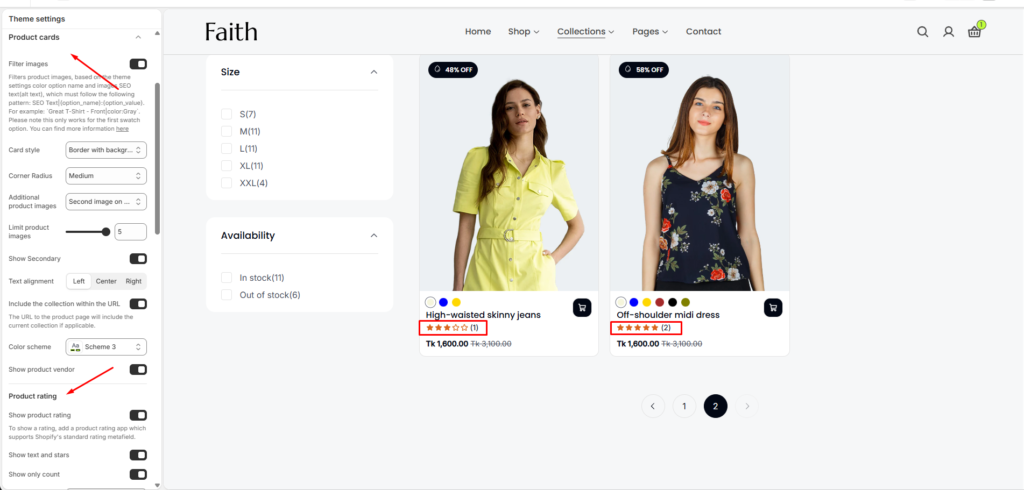
Product Rating Settings
| Settings | Description |
|---|---|
| Show Product Rating | Enable or disable product ratings on product cards. Requires a review app that supports Shopify standard rating metafields. |
| Show Text and Stars | Display both star icons and rating text/count together. |
| Show Only Count | Display only the total number of product reviews. |
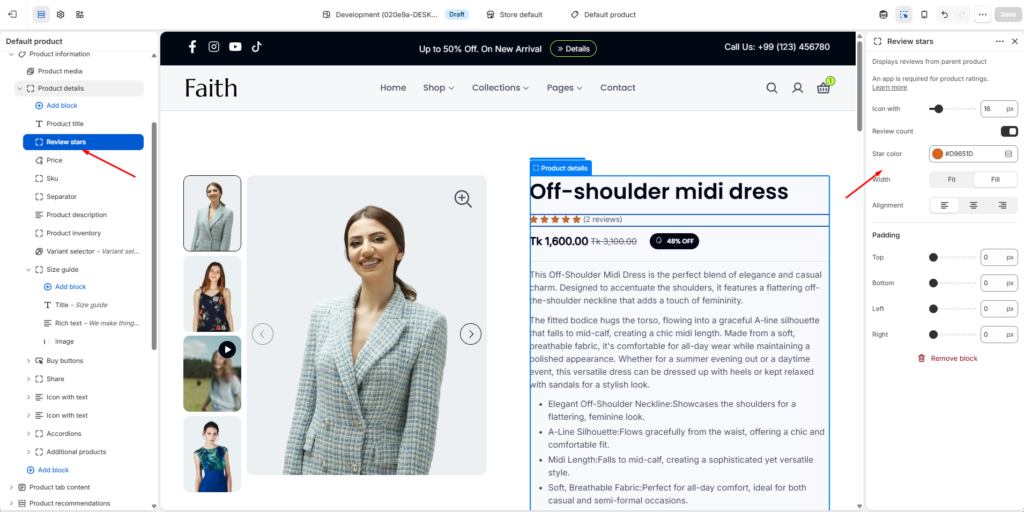
Add Review Stars on Product Page
Go to Admin → Online Store → Themes
Click Customize
Open Default Product template
Select Product information section
Click Add block
Add Review Stars block
The Review Stars block displays customer ratings directly under the product title or inside product information.
Review Stars Block Settings
| Settings | Description |
|---|---|
| Icon Width | Adjust the review star icon size. |
| Review Count | Show or hide the total number of customer reviews. |
| Star Color | Customize the star rating color. |
| Width | Choose the review block width. Available options include Fit and Fill. |
| Alignment | Set the review stars alignment. |
| Padding Top | Add spacing above the review stars. |
| Padding Bottom | Add spacing below the review stars. |
| Padding Left | Add left spacing for the review block. |
| Padding Right | Add right spacing for the review block. |
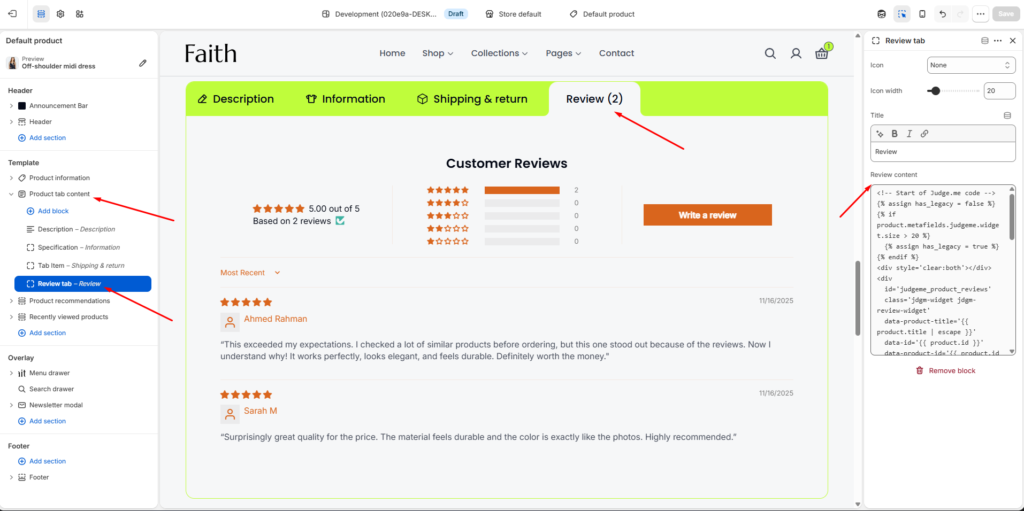
Add Review Tab in Product Tab Content
Go to Admin → Online Store → Themes
Click Customize
Open Default Product template
Select Product Tab Content section
Click Add block
Choose Review Tab
The Review Tab displays the full customer review widget inside product tabs.
Review Tab Settings
| Settings | Description |
|---|---|
| Icon | Select an icon for the review tab heading. |
| Icon Width | Adjust the tab icon size. |
| Title | Add the review tab title text. |
| Review Content | Add the review app widget code or review content integration. |
After setup, customer reviews will display:
- Product card star ratings
- Product page review stars
- Review count
- Customer review tab
- Full review content from the review app