



How to Access the Image Banner Section
Go to Admin → Online Store → Themes
Click Customize on your active theme
Open your selected page template
Find and select the Image Banner section
From here, you can customize:
- Banner layout
- Content groups
- Heading and text content
- Buttons
- Icons
- Animated text
- Social icons
- Media overlay
- Colors and spacing
The Image Banner section allows you to create attractive hero banners with images, text, buttons, and custom content blocks. It helps showcase promotions, brand messages, featured content, or landing page introductions with flexible layouts.
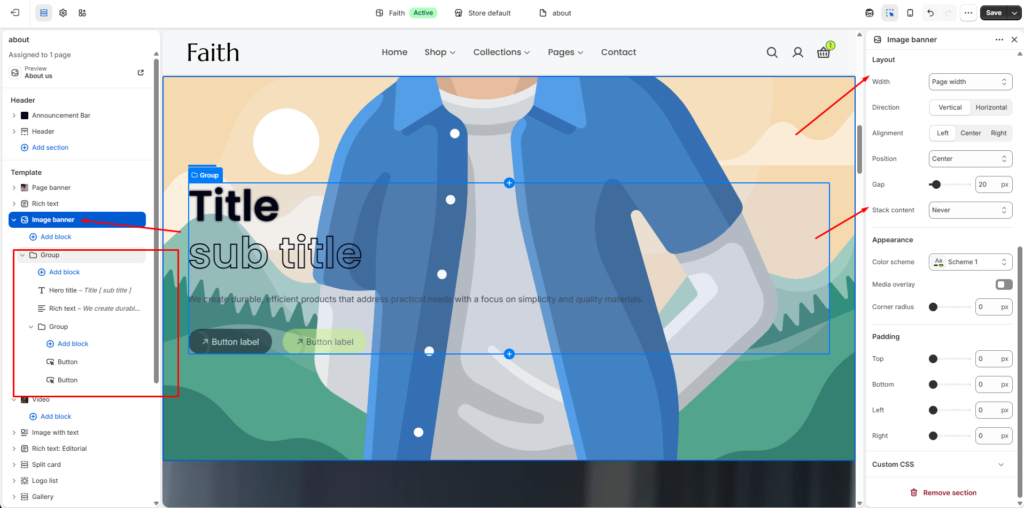
Image Banner Section Settings
| Settings | Description |
|---|---|
| Width | Choose the container width for the Image Banner section. Available options include Page width and Full width. |
| Direction | Select the content direction. Available options include Vertical and Horizontal layouts. |
| Alignment | Adjust content alignment using Left, Center, or Right options. |
| Position | Choose the placement position of the banner content. |
| Gap | Adjust spacing between content elements. |
| Stack Content | Control how content stacks across different screen sizes. |
| Color Scheme | Select a predefined color scheme to match your store design. |
| Media Overlay | Enable an overlay effect on the banner image for better content visibility. |
| Corner Radius | Adjust the border radius to create rounded banner corners. |
| Padding Top | Add top spacing inside the banner section. |
| Padding Bottom | Add bottom spacing inside the banner section. |
| Padding Left | Add left spacing inside the banner section. |
| Padding Right | Add right spacing inside the banner section. |
| Custom CSS | Add custom CSS styles to further customize the section appearance. |
Image Banner Block Settings
| Settings | Description |
|---|---|
| Add Block | Add multiple content blocks inside the banner layout. |
| Group Block | Organize multiple elements together inside a content group. |
| Hero Title | Add large highlighted banner titles with subtitle styling. |
| Rich Text Block | Add descriptions, brand messages, or formatted text content. |
| Button Block | Add call-to-action buttons with custom links. |
| Icon Block | Display icons inside the banner content area. |
| Inline Rich Text | Add inline formatted text content. |
| Line Animated Text | Add animated text effects for creative headings. |
| Social Icons | Display social media icons with profile links. |
| Accordion Item | Add expandable content items inside the banner. |
| Countdown Timer | Display countdown timers for offers, launches, or campaigns. |