



How to Access the Shop The Look Section
- Go to Admin → Online Store → Themes
- Click Customize on your active theme
- Open the Home page template
- Find and select the Shop The Look section
- From here, you can customize:
- Main image
- Product hotspots
- Featured products
- Layout style
- Colors
- Spacing
- Section padding
The Shop The Look section allows you to showcase a lifestyle image with interactive product points, helping customers discover and purchase items directly from the image.
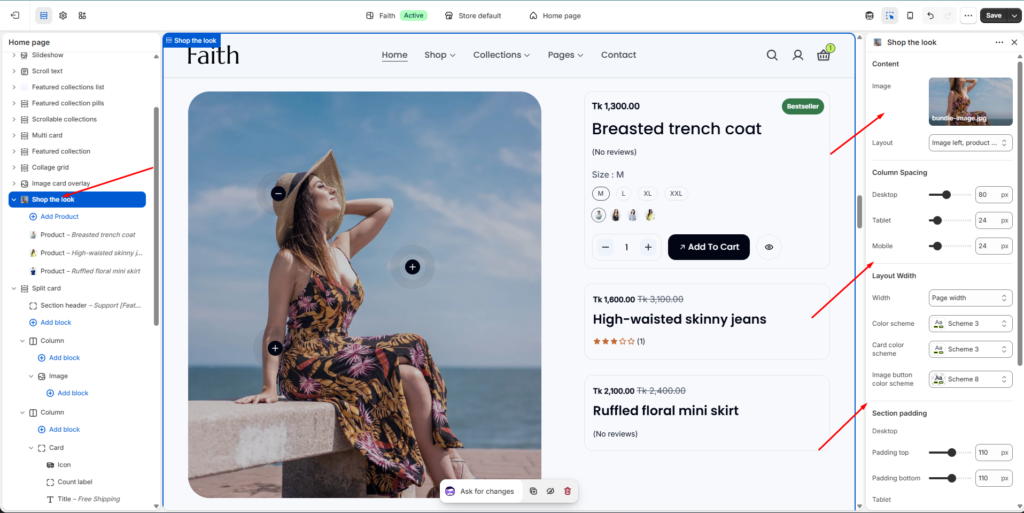
Shop The Look Section Settings
| Settings | Description |
|---|---|
| Image | Upload or select the main lifestyle image displayed in the section. |
| Layout | Choose the position of image and product content. Example: Image left, products right. |
| Width | Choose the section layout width. Available options include Page width and Full width. |
| Color Scheme | Select the main section color scheme. |
| Card Color Scheme | Customize the product card appearance. |
| Image Button Color Scheme | Choose the color style for hotspot buttons on the image. |
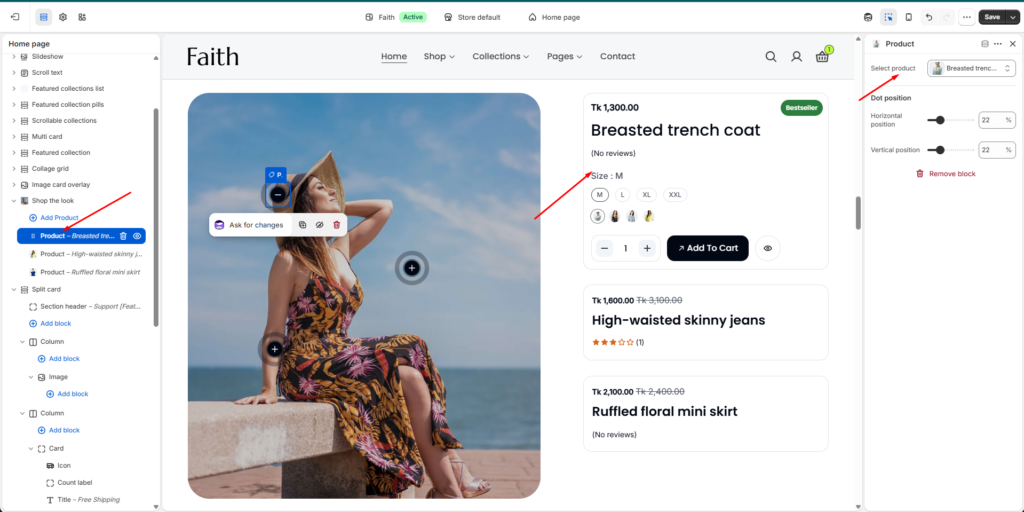
Product Hotspot Settings
Each product block creates an interactive point on the image.
| Settings | Description |
|---|---|
| Select Product | Choose the product connected with the hotspot. |
| Horizontal Position | Adjust the hotspot position horizontally on the image. |
| Vertical Position | Adjust the hotspot position vertically on the image. |
Use horizontal and vertical position controls to place the product marker exactly over the related item in your image.
Product Display Settings
Customize products shown beside the image.
| Settings | Description |
|---|---|
| Add Product | Add additional products to the Shop The Look section. |
| Product Card | Displays product image, title, price, variants, reviews, and add-to-cart option. |
| Multiple Products | Add multiple shoppable products connected with image hotspots. |
Column Spacing
Control the spacing between the image and product area.
| Device | Description |
|---|---|
| Desktop | Adjust column spacing on desktop screens. |
| Tablet | Adjust column spacing on tablet devices. |
| Mobile | Adjust column spacing on mobile devices. |
Section Padding
Adjust spacing around the entire section.
| Device | Settings |
|---|---|
| Desktop | Padding Top / Padding Bottom |
| Tablet | Padding Top / Padding Bottom |
| Mobile | Padding Top / Padding Bottom |
Remove Options
| Option | Description |
|---|---|
| Remove Product | Delete a selected product hotspot from the section. |
| Remove Section | Remove the entire Shop The Look section from the page. |