



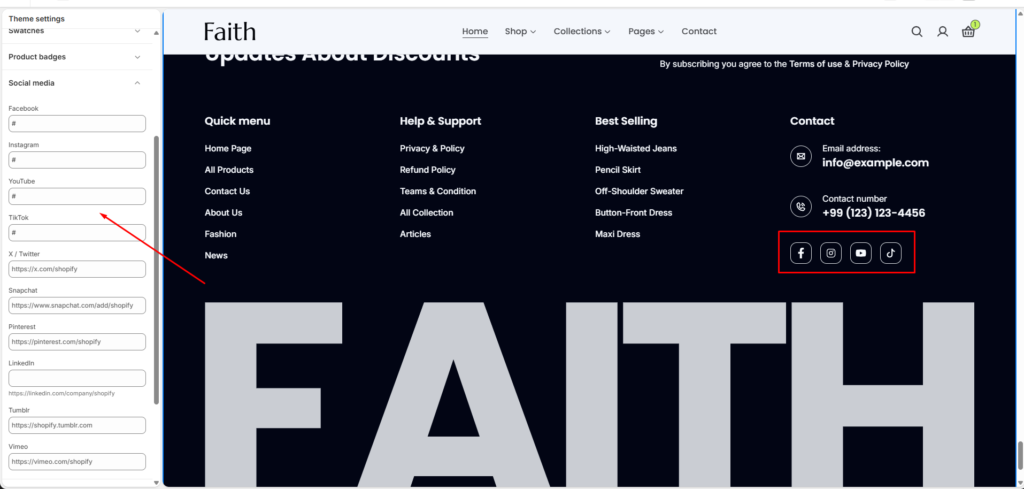
Social Media Settings
| Settings | Description |
|---|---|
| Add your Facebook profile or page URL to display the Facebook social icon. | |
| Add your Instagram profile URL to display the Instagram social icon. | |
| YouTube | Add your YouTube channel URL to display the YouTube social icon. |
| TikTok | Add your TikTok profile URL to display the TikTok social icon. |
| X / Twitter | Add your X (Twitter) profile URL to display the X social icon. |
| Snapchat | Add your Snapchat profile URL to display the Snapchat social icon. |
| Add your Pinterest profile URL to display the Pinterest social icon. | |
| Add your LinkedIn page URL to display the LinkedIn social icon. | |
| Tumblr | Add your Tumblr profile URL to display the Tumblr social icon. |
| Vimeo | Add your Vimeo profile URL to display the Vimeo social icon. |
The Social Media settings allow you to connect your store with social platforms by adding profile links. Added links will automatically display their respective social icons, helping customers follow your brand and stay connected.