



How to Access the Image with Text Section
- Go to Admin → Online Store → Themes
- Click Customize on your active theme
- Open the required Template
- Search for and select the Image with text section
- Click Add block to add new content blocks
- Inside each Column, you can add multiple blocks such as:
- Image
- Title
- Rich text
- Button
- Icon
- Inline richtext
- Social icons
- Line animated text
- Hero title
- Countdown timer
- Accordion item
This section helps you create engaging layouts by combining images and content side by side.
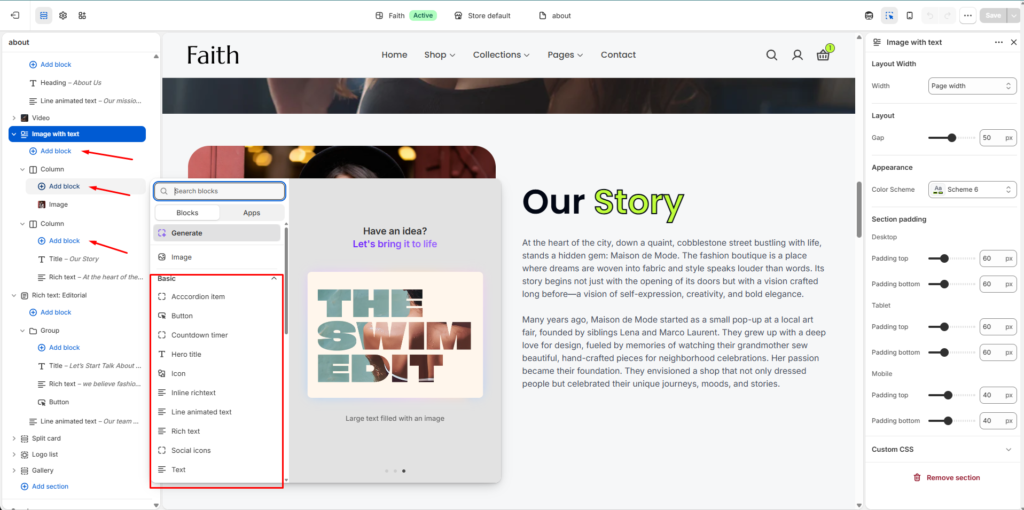
| Settings | Description |
|---|---|
| Width | Choose the container width for the Image with text section. Available options include Page width and Full width. |
| Gap | Adjust the spacing between image and content columns. |
| Color Scheme | Select a predefined color scheme to match your store branding and design style. |
| Padding Top | Add top spacing for the section separately for Desktop, Tablet, and Mobile devices. |
| Padding Bottom | Add bottom spacing for the section separately for Desktop, Tablet, and Mobile devices. |
| Add Block | Dynamically add multiple content blocks inside the section layout. |
| Column | Create separate content columns for organizing images and text content. |
| Image Block | Add images inside the section to visually highlight products, stories, or promotional content. |
| Title Block | Add headings or section titles such as “Our Story” or promotional titles. |
| Rich Text Block | Add paragraph content, descriptions, brand stories, or custom formatted text. |
| Button Block | Add call-to-action buttons for navigation or promotional links. |
| Icon Block | Display icons alongside content for visual enhancement. |
| Inline Richtext | Add inline formatted text content within the layout. |
| Social Icons | Display social media icons with links to social profiles. |
| Line Animated Text | Add animated line text effects for interactive content presentation. |
| Hero Title | Display large highlighted titles for promotional or branding purposes. |
| Countdown Timer | Add a countdown timer for campaigns, launches, or special offers. |
| Accordion Item | Add expandable collapsible content blocks inside the section. |
| Responsive Layout | The section automatically adjusts the layout for desktop, tablet, and mobile devices. |
| Custom CSS | Add custom CSS styles to further customize the section appearance and spacing. |