



How to Access the Scrollable Collections Section
Go to Admin → Online Store → Themes
Click Customize on your active theme
Open the Home page template
Find and select the Scrollable Collections section
From here, you can customize:
- Background image
- Scrolling text content
- Collection items
- Collection images
- Collection titles
- Scrolling speed
- Moving direction
- Colors and spacing
The Scrollable Collections section allows you to showcase multiple collections with an animated scrolling layout. It helps customers explore product categories in an engaging and interactive way.
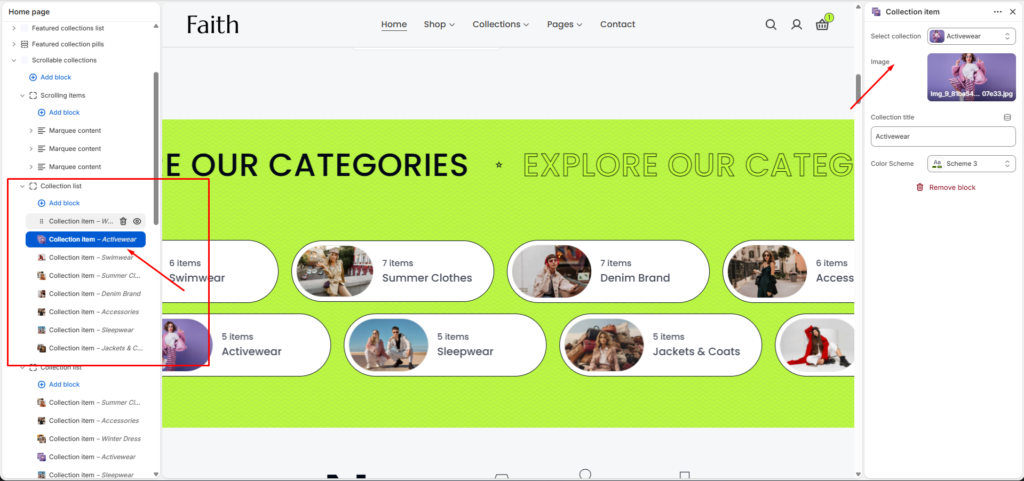
Scrollable Collections Section Settings
| Settings | Description |
|---|---|
| Background Image | Upload a background image for the section design. |
| Width | Choose the container width for the Scrollable Collections section. Available options include Page width and Full width. |
| Color Scheme | Select a predefined color scheme to customize the section style. |
| Speed | Control the scrolling animation speed. |
| Moving Direction | Choose the scrolling direction such as Right to Left or Left to Right. |
| Pause On Hover | Pause the scrolling animation when customers hover over the content. |
| Padding Top | Adjust top spacing separately for Desktop, Tablet, and Mobile devices. |
| Padding Bottom | Adjust bottom spacing separately for Desktop, Tablet, and Mobile devices. |
| Add Block | Add multiple scrolling content or collection blocks inside the section. |
| Custom CSS | Add custom CSS styles to customize the section appearance. |
Collection Item Settings
| Settings | Description |
|---|---|
| Select Collection | Choose a collection to display inside the scrolling section. |
| Image | Upload a custom image for the collection item. |
| Collection Title | Add or customize the collection title text. |
| Color Scheme | Select a predefined color style for individual collection items. |
Marquee Content Settings
| Settings | Description |
|---|---|
| Text | Add scrolling marquee text content for highlighting messages or categories. |
| Text Style | Customize the appearance of the scrolling text content. |