



How to Access the Scroll Text Section
Go to Admin → Online Store → Themes
Click Customize on your active theme
Open the Home page template
Find and select the Scroll Text section
From here, you can customize:
- Marquee content
- Scrolling text
- Icons
- Buttons
- Animation speed
- Moving direction
- Pause on hover
- Colors and spacing
The Scroll Text section allows you to display animated scrolling announcements, promotional messages, offers, and important information. You can add multiple text, icon, and button blocks to create an engaging marquee banner.
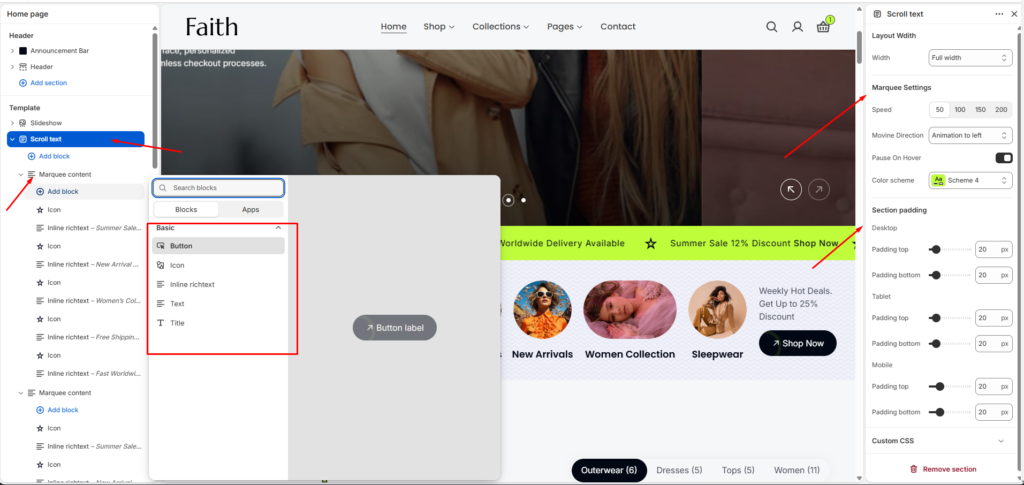
Scroll Text Section Settings
| Settings | Description |
|---|---|
| Width | Choose the container width for the Scroll Text section. Available options include Page width and Full width. |
| Speed | Control the scrolling animation speed of the marquee text. |
| Moving Direction | Choose the animation direction for scrolling content. |
| Pause On Hover | Pause the scrolling animation when customers hover over the section. |
| Color Scheme | Select a predefined color scheme to customize the section style. |
| Padding Top | Adjust top spacing separately for Desktop, Tablet, and Mobile devices. |
| Padding Bottom | Adjust bottom spacing separately for Desktop, Tablet, and Mobile devices. |
| Add Block | Add multiple content blocks inside the marquee section. |
| Custom CSS | Add custom CSS styles to further customize the section appearance. |
Marquee Content Block Settings
| Settings | Description |
|---|---|
| Icon Block | Add icons between scrolling content for visual separation or highlighting. |
| Inline Rich Text | Add formatted text content such as offers, announcements, or promotional messages. |
| Text Block | Add simple text content inside the marquee slider. |
| Title Block | Add heading-style content inside the scrolling area. |
| Button Block | Add call-to-action buttons with custom links. |
Inline Rich Text Settings
| Settings | Description |
|---|---|
| Text | Add and customize inline formatted text content. |
| Text Style | Choose between Body and Subtitle text styles. |
| Size | Adjust text size with Small, Medium, and Large options. |
| Padding Top | Add top spacing for the inline text block. |
| Padding Bottom | Add bottom spacing for the inline text block. |
| Padding Left | Add left spacing for the inline text block. |
| Padding Right | Add right spacing for the inline text block. |