Go to Admin → Online Store → Themes Click Customize on your active theme Open the Home page template Find and select the Collage Grid section
From here, you can customize:
Section header
Image cards
Video cards
Collection links
Buttons
Card layout
Video controls
Colors and spacing
The Collage Grid section allows you to showcase multiple images, videos, and promotional cards in a creative grid layout. It helps highlight collections, featured products, lifestyle content, and brand stories with an engaging visual experience.
Collage Grid Section Settings
Settings
Description
Width
Choose the container width for the Collage Grid section. Available options include Page width and Full width.
Color Scheme
Select a predefined color scheme to customize the section appearance.
Padding Top
Adjust top spacing separately for Desktop, Tablet, and Mobile devices.
Padding Bottom
Adjust bottom spacing separately for Desktop, Tablet, and Mobile devices.
Add Block
Add multiple image, video, and content blocks inside the collage layout.
Custom CSS
Add custom CSS styles to further customize the section design.
Image Block Settings
Settings
Description
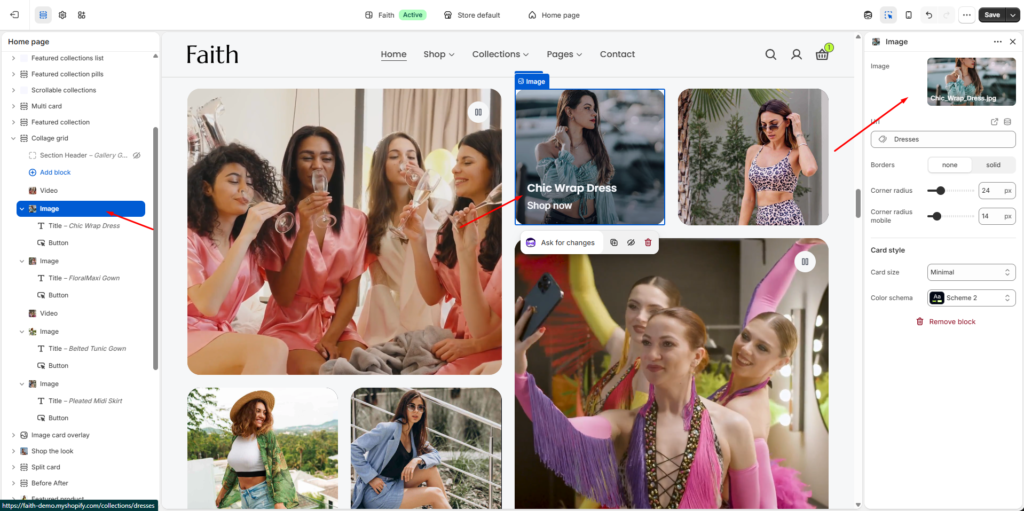
Image
Upload an image to display inside the collage card.
Link
Add a collection or custom URL for the image card.
Borders
Choose the card border style such as None or Solid.
Corner Radius
Adjust desktop corner radius for rounded image cards.
Corner Radius Mobile
Adjust mobile corner radius separately.
Card Size
Choose card display style. Available options include Expanded, Balanced, and Minimal.
Color Scheme
Select a predefined color scheme for the image card.
Video Block Settings
Settings
Description
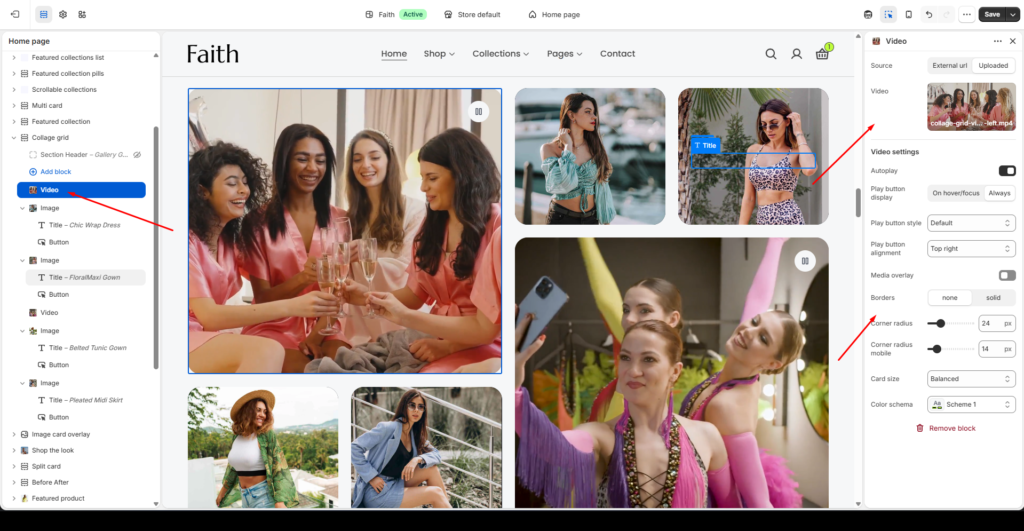
Source
Choose video source type. Available options include External and Uploaded.
Video
Upload a video file for the collage card.
Autoplay
Enable automatic video playback.
Play Button Display
Control when the play button appears.
Play Button Style
Customize the video play button style.
Play Button Alignment
Adjust play button placement on the video.
Media Overlay
Add an overlay effect on video content.
Borders
Choose video card border style such as None or Solid.
Corner Radius
Adjust desktop corner radius for the video card.
Corner Radius Mobile
Adjust mobile corner radius separately.
Card Size
Choose video card display size. Available options include Expanded, Balanced, and Minimal.
Color Scheme
Select a predefined color scheme for the video card.
Content Block Settings
Settings
Description
Section Header
Add a heading or introduction content for the collage section.