



How to Access the Accordions Section
Go to Admin → Online Store → Themes
Click Customize on your active theme
Open Default product template
Select the Product details section
Find and select the Accordions block
From here, you can customize:
- Accordion items
- FAQ content
- Heading and text
- Icons
- Collapse icons
- Spacing
- Rounded corners
- Color scheme
- Padding
The Accordions section allows you to organize product information in expandable content areas. It helps display FAQs, shipping details, return information, product guides, or additional details while keeping the product page clean and easy to browse.
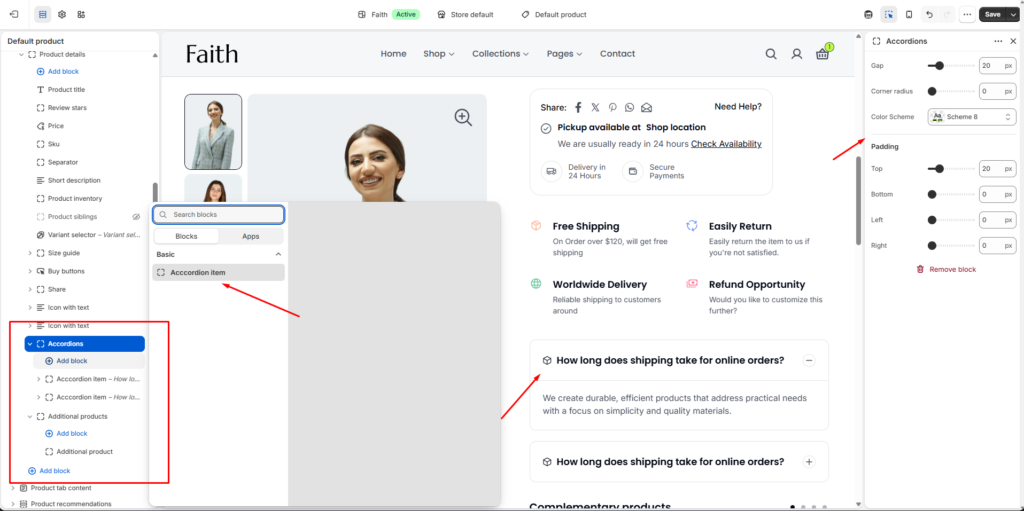
Accordions Section Settings
| Settings | Description |
|---|---|
| Gap | Adjust the spacing between each accordion item. |
| Corner Radius | Customize the rounded corners of accordion containers. |
| Color Scheme | Select a predefined color scheme for accordion background and text styling. |
| Padding Top | Add spacing above the accordion section. |
| Padding Bottom | Add spacing below the accordion section. |
| Padding Left | Control left side spacing of the accordion section. |
| Padding Right | Control right side spacing of the accordion section. |
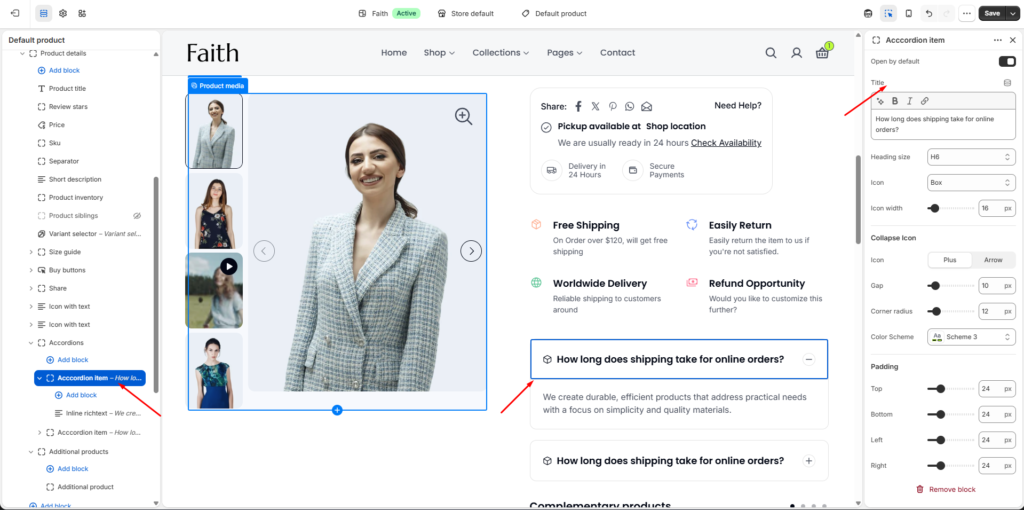
Accordion Item Settings
| Settings | Description |
|---|---|
| Add Block | Add multiple accordion items inside the section. |
| Open by Default | Choose whether the accordion item stays open when the page loads. |
| Title | Add the accordion heading or question text. |
| Heading Size | Select the accordion title size such as H1–H6. |
| Icon | Choose an icon displayed before the accordion title. |
| Icon Width | Adjust the size of the selected icon. |
| Collapse Icon | Select the expand and collapse icon style such as Plus or Arrow. |
| Gap | Adjust spacing between accordion elements. |
| Corner Radius | Control the roundness of each accordion item. |
| Color Scheme | Change individual accordion item colors. |
| Content Block | Add detailed information, answers, or descriptions inside the accordion. |
| Padding Top | Adjust top spacing inside the accordion item. |
| Padding Bottom | Adjust bottom spacing inside the accordion item. |
| Padding Left | Adjust left spacing inside the accordion item. |
| Padding Right | Adjust right spacing inside the accordion item. |